

If you’re an agency or local business looking to improve Google Map Ranking, this guide lays out everything you need—from setup to monitoring. We’ll walk through each step, explain the technical side, and show you how DAXRM’s Local Rank Tracker ties it all together.
1. Optimizing Your Google Business Profile
Your Google Business Profile (GBP) listing is the foundation of local search results—proper setup here is essential as it directly affects Google Map Ranking.
- Claim and verify your listing
Only verified profiles can appear in Maps and Searches. To claim and verify your Google Business Profile, go to google.com/business, search for or add your business, then follow the steps to receive a verification code—usually by postcard, phone, or email—and enter it in your GBP dashboard to complete the process. - Complete profile fields
Fill out the business name without stuffing keywords. Fill out your address, phone, website link, business hours, categories, and attributes. Incomplete listings will rank lower. - Choose accurate categories
Select one primary category and up to nine secondary categories that describe your services precisely. For example: “Plumber” (primary), “Water Heater Installation” (secondary). - Write an optimized business description
Include your main keyword (e.g., “emergency plumber in [City]”), a brief service overview, and a call to action. Keep it to 750 characters max. - Add high-quality photos and videos
Upload 10–20 images showcasing your location, services, and staff. Update monthly to keep your listing fresh. - Use GBP Posts
Share weekly updates like events, promotions, or new content with CTAs. Posts receive prominent placement in local search results. - Manage Q&A and messages
Respond to questions promptly; monitoring these features shows activity, authority, and user engagement. - Monitor and respond to reviews
Aim for a 4.5+ average rating. Reply within 24 hours—even to negative reviews—to boost credibility.
See Also : 7 Essential SEO Tools for Every Digital Marketer
See Also : How Page Size Affect Performance
See Also : Optimize On-Page SEO With SEMrush
2. Implementing Local Business Schema Markup
Once your Google Business Profile is fully optimized, the next step is to strengthen your website’s local relevance by implementing Local Business Schema Markup—a type of structured data that helps Google better understand your business location and services.
- Add LocalBusinessJSON-LD markup
Include fields like @type, name, address, telephone, openingHours, and geo (latitude/longitude). - Example:
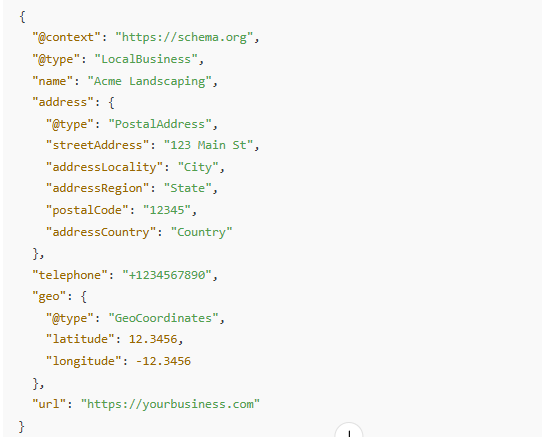
- Validate your markup
Test with Google’s Rich Results Test and Schema Markup Validator. (schemaapp.com) - Maintain consistency
The NAP (Name, Address, Phone) in your schema must match your GBP listing exactly.
3. Embedding Google Map on Your Contact Page
After adding schema markup, you should also embed a Google Map on your contact page to reinforce your location signals and make it easier for both users and search engines to find your business.
- Generate the embed code
In Google Maps, find your GBP listing → Share → Embed a map → Copy the iframe code. - Insert into your Contact page
Add the iframe just below or above your address section or NAP. Include schema markup for the business near the map. - Technical SEO benefit
Embedding the map confirms your business location to Google, supporting both geo ranking and local search results.
4. Getting Reviews from Your Targeted Locations
Customer reviews are a major trust signal for Google—and when they come from users in your target service areas, they also boost your relevance in local search results and help improve your Google Map Ranking.
- Request reviews from relevant customers
Ask satisfied customers to review with location-specific queries: “How was our service in Downtown?” Timely and location-tagged reviews boost local signals. - Automate review requests
Use email or SMS to request feedback within 48 hours of service. - Respond promptly
Acknowledge every review with personalized replies. Measuring changes in local search results traction helps improve overall performance.
5. Updating Local Listings/Citations with Accurate NAP
Keeping your business Name, Address, and Phone number (NAP) consistent across all online directories is critical for building trust with Google. Correct and consistent NAP is essential for maintaining stable rankings in local search results.
- Audit your citations
Audit your citations using tools like BrightLocal, Whitespark, or Moz Local, or manually check platforms such as Yelp, Bing, Yellow Pages, Foursquare, and relevant industry directories. - Fix inconsistencies
Align every directory with your GBP NAP, including abbreviations, phone format, and suite numbers. - Add missing citations
Submit to authoritative directories, especially local/niche-specific ones. - Remove duplicates
Merged or duplicate listings confuse Google and weaken ranking signals. - Track citation changes
Review NAP listings quarterly for accuracy and updates.
See Also : YouTube Tags vs Keywords
See Also : Embed YouTube Video on Website
See Also : YouTube Tags vs Hashtags
6. Building Local Backlinks
Backlinks from locally relevant websites not only improve your domain authority but also send strong geographic signals to Google that can positively impact your local search visibility and Google Map Ranking.
- Local outreach
Write guest posts or sponsor events on local websites (e.g., “Sponsored the Main Street Festival”). - Directory placements
Get listed in city or industry-specific business directories. - Community engagement
Sponsor local teams, volunteer, or host workshops, then get linked from local news and websites. - Create local content
Publish helpful local guides or case studies (even if you’re drafting outlines with a free AI paper writer to speed up the first pass), then outreach to local blogs or news sites. - Leverage partnerships
Collaborate with suppliers, partners, or industry associations for mutual backlinks.
7. Tracking Progress with DAXRM’s Local Rank Tracker
Once your local SEO elements are in place, it’s essential to monitor how they’re performing—and that’s where DAXRM’s Local Rank Tracker helps you track Google Map Ranking, geo ranking, and local search results with precision.
- Pin-based tracking grid
Drop custom pins around your business to track Google Map Ranking in targeted zones. - Real-time updates
Get up-to-date changes in map visibility and local SERP standings. - Competitor monitoring
Compare your GBP ranking to competitors’ at the same pin. See who ranks higher for local search queries. - Automated scans & reports
Schedule scans and reports weekly or monthly. Reports display rank improvements down to exact coordinates. - Multi-location support
Manage multiple GBP listings from one DAXRM dashboard—ideal for franchises or multi-branch businesses.
8. Adding Location-Specific Service Pages
To support your local SEO efforts and improve visibility in Google Map Ranking and local search results, your website should include service pages targeting each suburb or area you serve.
- Create dedicated pages per service area
Example URLs:
/plumber-richmond-vic/, /plumber-st-kilda-vic/, /plumber-footscray-vic/, /plumber-carlton-vic/ - Include unique content
Describe your service offering specific to each suburb. Mention local landmarks (e.g., “near Victoria Gardens Shopping Centre” or “servicing homes around St Kilda Beach”) and embed a Google Map centered on that suburb. - Add schema on each page
Use the LocalBusiness schema with properties like hasMap, geo, address, and serviceArea to help Google connect your services with the targeted location. - Optimize for long-tail geo keywords
Page titles and meta descriptions should include location-based search terms. For a stronger keyword-to-page strategy, a digital marketing course can help., e.g., “Best Plumber in Richmond – 24/7 Emergency Plumbing Services.” - Link from GBP listings
In your Google Business Profile services or products section, link directly to these suburb-specific pages to strengthen the connection between your GBP and your website.

Complete Coverage for Geo Ranking, Local Visibility, and Lead Generation
Optimizing your GBP and website, actively managing reviews and citations, building local links, and tracking performance with DAXRM means you’re covering every aspect of Google Map Ranking. You’ll see improvements in geo ranking, local visibility, website clicks, and customer leads—making this a surefire roadmap for local SEO success.